
To check the "Number of Visitors" in your website please follow the below steps:
1: Login to your C-panel, click on "Awstats" option under "Metrics section".
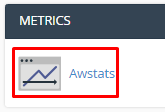
2: Here you will see "Awstats produces visual statistics about visitors of your site".

3: Under this you can choose any domain and click on "View" once you click on it you can check the number of visitors under "Monthly History".

